
The Ultimate list of the Questions and Answers
about our Forex trading simulator
Main Features
Purchase and registration
Testing Process
Historical Data
Indicators and Oscillators
Advanced Features
Different Types of Strategies
Compatibility
Valuable Details
Demo version and full version
Working with projects &
templates converter
templates converter
Other questions
How can I change the speed of testing?
You can change the speed of testing in the Forex Tester software by using a slider at the top.

Can I pause testing and continue it later?
Yes, definitely. You can pause testing and save the project with all elements to open it later. Please check the Creating a new project page to learn how to work with your projects.
Can I test data on several currency pairs simultaneously?
Yes, you can. Forex Tester allows you to open any number of charts for any currency pairs after downloading the data and creating a project.
Follow the instructions below if you have Forex Tester :
- Click the “Data Center” button on the Data tab → select the currency pair(s) → click the “Update from server” button → “Update”.
- Create a project by clicking the “New Project” button on the Home tab.
- Click the “Start Test” button.
You can also learn how to download the data on the Importing data page.
In case you use FT3 or FT4, please do the following:
- Click the “Data Center” button → select the currency pair(s) → click the “Update from server” button → “Update”.
- Create a project through the File → New Project menu or use the “New Project” button on the Main Toolbar.
- Click the “Start Test” button.
In case you use FT2, please do the following:
- Click File → Data Center → Update from server to download the data.
- Open File → Generate Ticks → Select the time period, currency pair(s), and generation method → Generate.
- Switch to Testing Mode (click the “History Mode” button in the top left).
- Click the “Start Test” button.
The charts for these pairs will be moving simultaneously.
If you have not updated/imported the data, you can’t open the charts for these pairs in the program at all.
Can I test data on several timeframes simultaneously?
Forex Tester allows you to open any required number of charts on any timeframes. The charts for these timeframes will be moving simultaneously.
For example, you can add multiple charts of the same currency pair and select a different timeframe for each chart.
All these charts are synchronized in time during testing.
You can add a new chart by clicking the “New Chart” button on the Charts tab.

To see all the charts on the same screen, use the Tile Horizontally/Vertically buttons on the Windows tab.

Do I have to run statistics manually?
Forex Tester provides detailed statistics during the test, and after the trades have been closed, so you no longer have to waste your time on manual analysis!
If you’re using our latest FT version, the Statistics tab is displayed at the Forex Tester’s top-left corner next to the chart.

If you can’t find such a tab there, you need to enable it by clicking the “Statistics” button on the Windows tab.

If you are a Forex Tester 4 (or 3) owner, please click the View tab in the top horizontal menu, hover the cursor over the Show Panels option, and select Statistics to display the data.
In case you work with Forex Tester 2, go to View → Show Market Info and switch to the Stats tab.
How can I get aggregate information about this particular bar (candlestick)?
You can find the information about any bar/candlestick on the Data tab displayed at the bottom-left corner next to the chart by hovering the mouse on that particular bar/candlestick.

If you can’t find such a tab there, you need to enable it by clicking the “Data Window” button on the Windows tab.
If you operate FT4 (FT3), please click the View tab in the top horizontal menu, hover the cursor over the Show Panels option, and select the Data Window.
In FT2, the information is available through the View → Show Data Window. You will see all you need about each bar in the window.
What is the profit chart, and where can I find it?
The Profit chart is a great instrument for analysis of your strategy performance. It shows the balance, equity, margin, and dropdown in a comfortable visual way.
In Forex Tester , you can open the Profit chart by clicking the “Profit Chart” button on the Charts tab.

In Forex Tester 4 and , you can export the Profit chart to a text file or Excel via right-click.
If you run FT4 (FT3), please go to the File → Add Profit Chart to open it in the new window.
This chart is available in the View → Profit Chart → Show Profit Chart menu in case you use FT2.
Can I use Forex Tester offline?
Yes, you can use the Forex Tester program in offline mode. Our software needs an Internet connection only for downloading historical data from our servers.
Also, you can download data from our site: datasources.
And import this data into the program manually using the “Import from a file” button in the Data Center.
I purchased 1 license, and I want to install the Forex Tester on my home computer and my work computer. Can I do this?
If you have a Forex Tester or Forex Tester 4/3 license, you can use the same registration key on a few computers. The license allows you to install the software on your PC at home and, say, on a laptop at work. You’ll be able to run the program on the PC when you are not working with it on the laptop. Working with the Forex Tester on both machines simultaneously is not possible.
Your Forex Tester 2 registration key will work for one machine only. The software is attached to your computer and cannot be registered with the same key on another device.
You can move Forex Tester 2 to another computer in case your PC has crashed, or you bought a new PC.
I’ve already purchased 1 license, and after some time, I’ve decided to buy one more. Can I have a discount?
Yes, you can get a discount on the second license.
Please contact our support team to get the information about the best discount options that we offer now.
My computer where I installed the Forex Tester has broken (I purchased a new computer / I want to install the Forex Tester on a more powerful computer / etc.). What can I do?
If you have a Forex Tester license, download the software to the new PC. Install it, and click the REGISTER PROGRAM button on the Help tab. Enter your name, email, registration key and activate the software.
If you have a Forex Tester 4 or 3 license, download the software to the new PC and install it. Go to Help → About Program → NOT REGISTERED, and enter your name, email, registration key, and activate the software.
If you have access to the old PC, you can check the key in Help → About Program.
You can also transfer the data. Open C:\ForexTester on your old PC, copy the Projects, Templates, and Data folders and replace them on your new PC.
C:\ForexTester is a default location. If you installed the software into another folder, please replace the data in it.
Do the same steps if you own the Forex Tester 4 or 3 license.
If you own a Forex Tester 2 license, please do the following:
- Download Forex Tester 2 to your new computer and install the software.
- Run Forex Tester 2.
- Go to the Help → Register program menu.
- Choose “I do not have a registration key” and click Next.
- Select “Yes, I already paid” and click Next.
- Fill in the key request form in the next window. Choose the “Old key does not work” option as your reason for requesting the registration key. If you have forgotten some contact information, you can write “I don’t remember”.
- Click the “Request key” button.
- We will generate the registration key for you and send it via email within the next 24 hours (usually much faster).
If you have access to the old computer, you can move the data to a new PC. Please open the C:\ForexTester2 folder on your old PC. Copy the Projects, Templates, and Data folders to the USB flash drive. Then replace these three folders on the new PC.
Do I pay for your software once, or is it a monthly/yearly fee?
The license is a one-time payment. You won’t be charged in the future (unless you decide to upgrade to the next major version).
Everyone who buys Forex Tester also receives:
| Easy Forex Builder | Allows you to create strategies in a couple of clicks while not having programming skills. |
| 23 years of historical data | 1-minute data on 16 most common currency pairs, gold, and silver. |
| 10 simple manual strategies | Very simple methods to gain backtesting experience with our Forex analysis software. |
| 5 price action-based EAs along with detailed instruction on the strategies’ rules | Test these strategies out and see for yourself whether you can compose a solid trading system. |
| Popular expert advisers | Money management trading system that proves one can trade profitably, without any technical analysis involved. |
| 11-step plan on how to get the most out of backtesting | White paper about finding a profitable strategy; vital suggestions on how to succeed in the real market in the future. |
| Risk calculation + Money management table | The white paper and the Excel file will allow you to stay in the market even if you continue to lose all of your trades. |
| How to choose a broker | White paper on the most crucial component of the Forex market. |
| 20 indicators to try today to improve your trading tomorrow | A complete guide to the 20 TOP indicators usage: settings, trading signals, examples of strategies. |
The program says that my registration key is incorrect. What is wrong?
The Hardware ID on your computer has probably changed for some reason (for example, you changed hardware or reinstalled the OS). Do not worry, as we will issue a new registration key to you for free.
Please follow these steps to re-register the program:
- Run your Forex Tester 2.
- Go to the Help → Register program.
- Choose “I do not have a registration key” and click Next.
- Select “Yes, I already paid” and click Next.
- Fill in the key request form in the next window. Choose the “Old key does not work” option as the reason for requesting the registration key. If you’ve forgotten some contact information, you can write “I don’t remember”.
- Click the “Request key” button.
- We will generate a registration key for you and send it via email within the next 24 hours (usually much faster).
This instruction is accurate for Forex Tester 2 only. You won’t have this issue in Forex Tester 3 / 4 / as it is not attached to the computer, and you can install it on a few computers with the same registration key. You’ll then be able to work on the computers in turns.
Upgrade to Forex Tester and get all the advantages of the latest version!
Do you provide software upgrades for free?
We provide minor upgrades for free. For example, after the release of version 3, we issued versions 3.1, 3.2, ... 3.59. You can have these upgrades for free, and your registration key is valid for them. However, to upgrade to a new major version of Forex Tester , you need to pay an upgrade fee.
If you do not have any of the Forex Tester licenses, please purchase the full version of the software.
How can I get a discount?
You can get a discount if you purchase several Forex Tester licenses.
For example, you can buy a program for yourself and your friend.
Please go to the order page and select 2 licenses from the drop-down list. The price next to it will change, and you will see how much money you can save.
If you plan to buy more than 2 licenses, we’ll be happy to provide you with an even better discount!
Please contact our support team to get the information about the best discount options that we offer now.
For how long can I use my registration key?
There is no time limit for using your registration key. It can be used for as long as you wish. In some cases, when you change your computer or reinstall Windows OS, we’ll send you a new key.
That is absolutely free and does not take much time.
Can I get my money back if I don’t like Forex Tester ?
Yes, you can. We provide a 14-day money-back guarantee.
You risk losing only a few minutes on installing, buying, and registering our Forex Tester. Also, you’ll spend a couple of hours learning how to get the best out of the software. We offer a Forex Tester quick start guide and great video tutorials, so mastering the program would take even less of your time.
There’s no doubt that the possibility of finding out how to make money with Forex is well worth the effort!
There is so much information in Forex Tester. What should I begin with?
To start testing, you need to do three things:
- Download the data in the Data Center.
- Create a project.
- Start test.
Always keep them in mind, and backtesting will be a very simple process.
Please take a look at our Quickstart text and video tutorials.
Do I need the Internet connection to backtest my strategies?
No, you don’t. Forex Tester also works offline. You need the Internet if you want to download the data. The testing itself doesn’t require the Internet at all.
Can I copy the template from one chart and then apply it to another one?
Yes, you can use the same indicators, color schemes, and graphic instruments on many different currency pairs and timeframes. Please, visit our Using desktop and templates page to find out how to do this quickly and easily.
Can I create a custom timeframe?
Yes, you can do it easily by clicking the gear  button in the Timeframe section on the Home tab. Click “Add timeframe” and enter the necessary value into the field. For example, if you want to make a 6-hour timeframe, multiply it by 60 and enter 360. You can delete the unnecessary timeframes as well.
You can also make this list of timeframes default for your new projects by clicking the “Make default” button.

Can I trust the results of the test?
Forex Tester does not cooperate with any broker, which is why we provide only the most objective information. Unlike brokers, we do not want you to lose money. Instead, we want you to test different strategies and find those that are profitable. The more money you make on a real market because of our program, the more people you will tell about Forex Tester. Therefore, it is a win-win collaboration.
How long does the test last approximately?
It depends on the timeframe and the data period you use. You can adjust the testing speed to test many years of data for a few minutes/hours.
How can I change the update frequency of the chart?
Use the dropdown list next to the testing speed scrollbar. For example, you set the first dropdown menu at 1 hour and the second at 5 minutes. In this case, you will see 12 changes in the price because an hour has 12 5-minute periods.
How can I open an account in Forex Tester?
There is no need to open an account in Forex Tester. You just start the test, and you will have 10,000 dollars on your virtual deposit. If you want to increase or decrease this value, click the “Change Balance” button on the Order tab.
How to change the properties of a particular currency pair (spread, lot size, leverage, etc.)?
- Open the Data Center window.
- Select the necessary pair (for example, EURUSD).
- Click the “Change properties” button.
- Change the necessary values in the window that appeared.
- Click “OK”.
These settings should be done once while you create the project.
Does Forex Tester support partial closing of orders?
Yes, Forex Tester allows closing orders partially.
To close the part of the position, right-click on the open order in the Terminal window and select the “Close part of position” item.
In addition, you can use the hotkeys for this purpose. Click on the order and press Ctrl + F5 keys to partially close your order.
Can I test historical data on weekends?
Yes, Forex Tester is a stand-alone program, so you can use it for backtesting strategies even if the market is closed.
What is tick data?
Tick data is the data that displays all the changes in the price. For example, the price changed 36 times in 1 minute. If you use 1-min data, you will see only 4 prices of this bar: open, high, low, and close. If you use the tick data, then, in this particular case, you will notice all 36 changes. The tick data allows you to backtest the strategy as if you are trading on a real market. This type of data is a must for all scalping strategies. It is also very useful for medium- and long-term strategies for getting the most qualitative results.
Where can I get tick data?
The high-quality tick data is available for all users that are subscribed to the Super service.
Can I use my own data and not what Forex Tester provides?
Yes, Forex Tester clients can use data from their own sources. We support imports from .txt, .csv, and .hst files.
It is recommended to import 1-minute bars for accurate testing, but the program will work well with any timeframe.
Please view detailed instructions in the Importing data video guide.
How can I activate my data service?
If you have already purchased the subscription, please open Forex Tester and do the following:
- Click the “Activate Data Subscription” button on the Store tab.
- Enter your order number.
- Click the “Activate” button.
Please note: If you purchase Data Service along with Forex Tester in the bundle, you do not have to activate your data subscription. It will be automatically activated after you register the software.
You can check the status of your subscription in the bottom left corner of the Data Center window.
 Update the data from our server and start testing.
Does Forex Tester provide trend indicators?
The Forex Tester has many built-in trend indicators: Moving Averages, Bollinger Bands, Envelopes, Ichimoku, Parabolic SAR, etc.
You can find the full list of the indicators we offer by clicking the “List of indicators” button on the Home tab.
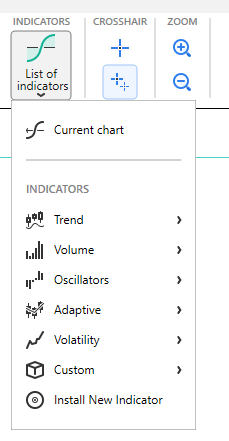
Moreover, you can search for the custom indicators at the Forex Tester forum.
Can I add indicators for a volume analysis?
Our program contains several indicators for volume analysis for more comprehensive backtesting. These are:
- On Balance volume
- Money Flow Index (MFI)
- Tick volume
Is it possible to use Bill Williams’ indicators for backtesting?
Accelerator, Alligator, Awesome indicators, and Fractals are available to the users of Forex Tester.
What oscillators can I use to backtest the strategy?
Forex Tester includes a lot of oscillators that allow you to use almost any possible strategy. There are Average True Range, Bulls Power, Bears Power, Commodity Channel Index, Elder’s Force Index, MACD, Momentum, Relative Strength Index, Stochastic Oscillator, Williams’ Percent Range, and many others.
Does the Forex Tester have Range bars chart?
Yes, there is an option to add the Range bars chart in the Forex Tester.
Please click the “Range bar” button on the Charts tab, choose the needed currency pair, and start testing!
More information on working with the Range bars chart you can find on the Chart adjustments page.
Does the Forex Tester have Renko bars?
Yes, there is an option to add the Renko bars chart in the Forex Tester.
Please click the “Renko bar” button on the Charts tab, choose the needed currency pair, and start testing!
More information on working with the Renko bars chart you can find on the Chart adjustments page.
Does the Forex Tester have any built-in EAs?
Forex Tester includes 6 built-in strategies: Awesome EA, Ichimoku EA, MACD EA, MACD+MA, Statement Processor, Stochastic EA. They are available by clicking the “Strategies List” button on the Strategies tab.

In addition, everyone who buys Forex Tester receives price action-based EAs along with detailed instruction about the strategies’ rules and a popular expert advisor based on the Money Management trading system.
The detailed information on using strategies in the Forex Tester is available on the Expert Advisers page.
We also provide an opportunity to install custom Expert Advisers. Your custom EA should be in .dll format.
What is a Quick Test in the Forex Tester?
A Quick Test is a feature that allows you to get fast backtesting results. If you have many different strategies and need to get a basic knowledge of their profit rate, the Quick Test option is just right.
In FT, you can run your Quick Test by clicking the corresponding button on the Strategies tab.

In Forex Tester 3 and 4, starting the Fast Test is available via the  icon on the main toolbar.
In Forex Tester 2, the same icon is available in the Testing Mode.
When you find the strategy that works, it is time to switch to a standard test and look at your strategy in more detail.
Can I test long-term strategies in Forex Tester ?
Yes, you can. You can download the data for the last 23 years for free and test strategies on such a long period of time. It is definitely enough data range for you to understand if the strategy is profitable or not.
Can I test scalping strategies?
Yes, you can test scalping strategies if you have tick data. You need to subscribe for a Super subscription for this because scalping strategies are very sensitive to price changes, even the smallest ones. We update this data every day (i.e., you can download data for the previous day). Click to read more about the subscription types.
I'm using the strategy that is based on volumes. Can I test it in your program?
Forex Tester supports tick volumes only. Subscribe to the Super data service to get reliable tick volume information.
Can I backtest strategies based on Fibonacci levels?
Yes, you can. A full range of Fibonacci tools is built in the Forex Tester: retracements, extensions, arcs, fan and time zones. This whole package will let you test any Forex strategy related to Fibo levels.
What Windows versions the Forex Tester is compatible with?
Forex Tester is compatible with Windows 2000 and higher versions (Windows 2000, 2003, XP, Vista, Windows 7, Windows 8/8.1, Windows 10). It is not compatible with Windows 95/98/Me.
Can Forex Tester work with Mac OS?
There is no Mac version of the software for now, but you can create a virtual machine with Parallels Desktop or VMWare Fusion and install Windows on it.
The web offers numerous articles with regards to how to handle this task.
You’ll then be able to use Forex Tester at full strength.
You can contact our support team for any technical assistance.
Can I switch Forex Tester to my native language?
Forex Tester is supported in 14 languages, including:
- English
- Spanish
- Portuguese
- German
- Italian
- Dutch
- Indonesian
- Hungarian
- Polish
- Thai
- Czech
- Vietnamese
- Turkish
- Slovak
You can switch to any of the languages mentioned above by clicking the Language dropdown menu on the Settings tab.
Can I reorganize the chart’s appearance?
You can adjust the colors of the candlesticks and the chart’s background by right-clicking on the chart and selecting the “Chart settings” option (or use the “Chart settings” button on the Charts tab).
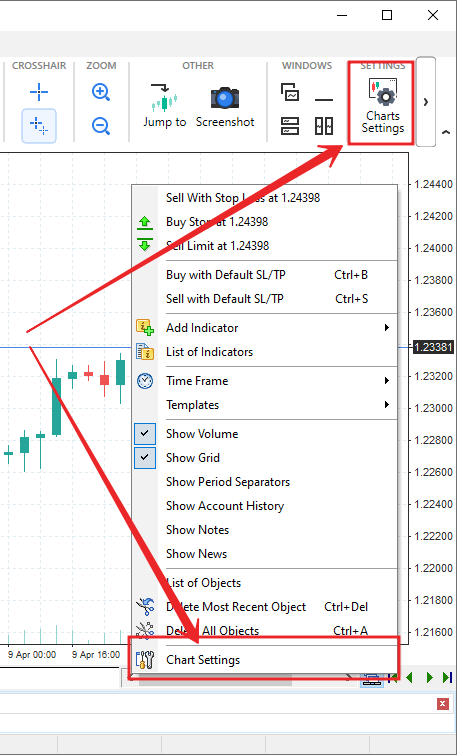
By the way, you can create a custom template and make it default for all charts.
Make all necessary changes in the “Color Scheme”, “Settings”, and “All charts” tabs, and apply the changes.
Then save these changes as a template:
- Right-click the chart window → Templates → Save template.
- Give the following name to the template: “default”.
- Click “Save” and overwrite the existing template.
How can I remove buy and sell markers and lines between them from a chart?
To remove the signs of the previous trades please do the following:
Right click on the chart → Chart settings → choose “Settings” tab → Uncheck “Show Account history” > Click “Ok” to save the changes.

Can I take a screenshot in your program?
Yes, you can do so by clicking the “Screenshot” button on the Charts tab.

Choose the required parameters and press “Ok”. By default, the picture will be saved on Disc (C:) → Forex Tester → Screens folder.
This feature is very useful if you want to share your trades with your mentor or if you are a mentor and teach others.
I have several monitors. Can I stretch the program across all of them and place one chart on each?
Yes, this feature has been added into Forex Tester 4 and .
- Click the “Minimize” button of any chart window at the top right corner of the screen.
- Start to drag the window that you need to move — thus, it will be detached — and release the mouse button.
- Drag again to place the chart at the required position.
How to set New York Close charts / how to remove the data for weekends?
For your convenience, we added a dropdown box with 4 trading sessions on the “Create new project” form:
- Sydney Close
- Tokyo Close
- London Close
- New York Close
All you need is to choose a New York Close session in the dropdown list.
Where can I download the demo version?
You can download it here: www.forextester.com/download.
What are the limitations of the demo version?
In the demo version, you cannot test more than 1 month of historical data, load and save projects and desktops, and continue testing after it was stopped. You have access only to the most important historical news for the USD currency in the demo version.
Where can I get a full version?
After registering the demo version with your registration key, all limitations will be removed, and it’ll become a full version.
How can I transfer my projects and templates to the Forex Tester 5 from my previous FT version?
To transfer your projects and templates to the Forex Tester version, open the C:\ForexTester? folder on your PC, copy the Projects and Templates folders, and replace them in the corresponding Forex Tester folders.
Your project and templates will appear in your FT5 program automatically.
To avoid mistakes, we recommend closing all previous versions of Forex Tester before transferring projects and templates.
To transfer your projects and templates to the Forex Tester 4 version, do the following:
- Go to the File → Import Projects/Templates
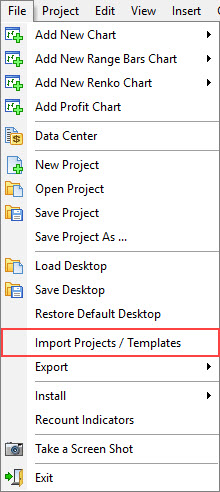
- Select the version of Forex Tester from which you need to transfer projects and templates in the opened window.
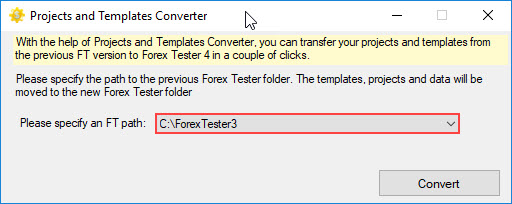
- Click the “Convert” button.
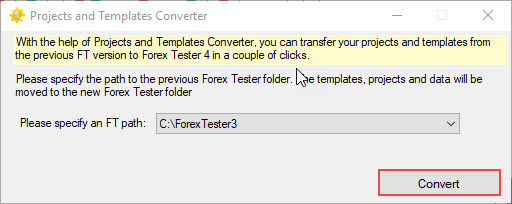
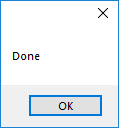
- In case of successful transfer of templates and projects, you will see an informational message.
I reinstalled my operating system, and the Forex Tester stopped working.
Forex Tester saves your hard drive configuration as a unique Hardware ID to identify your computer. In some cases, reinstalling the OS can change this ID. You need to send us your new Hardware ID, and we will generate a new registration key for you.
I purchased a Forex Tester program, but I can’t find a file with 10 manual strategies. How can I receive it?
Please go to this page: forextester.com/getpdf, enter your order number (which you received after Forex Tester purchase), and click the "Submit" button. After this, you will be able to download the file with strategies from our site.
I registered my Forex Tester but can only test 1 month of data. How can I test more data?
We included 1 month of historical data in our setup file for size reasons.
Please do the following to download more data:
- Click the “Data Center” button on the Data tab → “Update from server” → select the “Download part of history” radio button → set up the desired date range, and click “Update”.
- Create a new project by clicking the “New Project” button on the Home tab. Name the project, and click “Next”.
- Select the necessary pairs you want to test and dates of testing, and click “Next”.
- Start testing from the first date in the range or define any other day to start and click “Create”.
- Click the “Start Test” button when you are ready to start testing your strategy.
Also, you can download historical data from our site. It is free.
I opened the Data Center, but can still only see 18 pairs. How do I download data for other symbols?
After you subscribe to our paid data service you need to create the necessary symbol(s) in the Data Center window at first.
- Open the Data Center window and click the “Add” button in the bottom left to open the “Symbol properties” window.
- Select the necessary symbol from the list, check it, and click the “Apply” button. Please note that the symbols marked with a star icon are available only in our Paid Data Subscription (Standart/Super). All the properties of the added symbol will be filled automatically.

- When done, download the data for the symbol by selecting it from the list.
 INTROMOB10